


UC Browser-Safe, Fast, Private
4.4175.87K Reviews
App Specs
- Version
- Varies with Device
- Updated On
- License
- Free
- Downloads
- 1,000,000,000+
- Developer
- UCWeb Singapore Pte. Ltd.
- Categories
- Communication
- Platform
- Android, iOS
Screenshots
 Analysis by AppCompare
I tend to notice a browser most when I’m trying to do something else: check a shared link between errands, look up a detail while a conversation is moving along, or read an article without losing my place in the day. That is the kind of everyday communication UC Browser is meant to support. It is a free browser app from UCWeb Singapore Pte. Ltd., in the communication category, and its appeal is less about replacing every app on your phone than giving web links and quick searches a place to happen.
A browser for the gaps in the day
In practice, a browser shapes how quickly a message turns into useful information. Someone sends a restaurant page, a travel detail, or a news story, and I want to open it, get what I need, then return to the conversation without a lot of friction. UC Browser brings familiar browsing tasks together with extras such as downloads, night mode, and data-saving tools. That combination can suit people who move between links, media, and social sharing throughout the day.
It is not a messaging app, and I would not choose it to organize conversations or manage notifications. Its communication value is indirect: it helps me read, watch, and pass along web content. If your main need is private messaging or a shared workspace, a dedicated communication app is the better fit. If you often receive links and want a browser with more built-in options than a bare-bones tab for opening them, UC Browser is more relevant.
How it fits into a conversation
A realistic use is catching up with a group chat while commuting: open a link someone shared, read the key details, and send it onward if it is useful. The homepage shortcuts can make repeat visits to favorite sites quicker, while the download manager gives files a more deliberate place than an open tab you may forget. Those are small conveniences, but they can keep a quick check from turning into a long hunt through browser history.
I would still be selective about what I share. A browser makes it easy to pass along a page, but speed is not the same as clarity; I try to include a short note about why a link matters rather than dropping it into a busy chat without context. That is a personal habit, not a special UC feature, but it makes the app’s quick sharing more useful in real conversations.
Speed, comfort, and attention
Fast loading can make a browser feel responsive, particularly when I am checking several links in a short stretch. Night mode is useful for reading later in the evening, and data saving may help when I am browsing away from Wi-Fi. These tools address different kinds of friction: waiting, eye comfort, and mobile data use. I would not treat them as a reason to browse endlessly, though. A quicker route to a page can also make it easier to lose ten minutes to unrelated tabs.
My practical tip is to use the homepage shortcuts for sites I genuinely revisit, not every page that catches my eye. That keeps the first screen useful instead of turning it into another stream of distractions. If I open a link for one specific answer, I try to finish that task before following recommendations or opening more pages. The browser can smooth the handoff between a message and the web, but I still have to decide when I have enough information.
Worth Reading Before You Choose

Baby Panda World Brings Quick Play to Modern Phones, but Its Game Library Feels Busy

ESPN’s Live Game View Makes Following Close Games Easier

QuizzLand Review: A Good Fit for Short Trivia Breaks, Not Every Player

Basketball Stars: Multiplayer Is Fast, but Can It Recover When Matches Go Wrong?

WEBTOON Turns Phone Updates Into a Better Reading Routine

Link to Windows Runs on Shared Habits, Not Social Feeds
Privacy needs a closer look
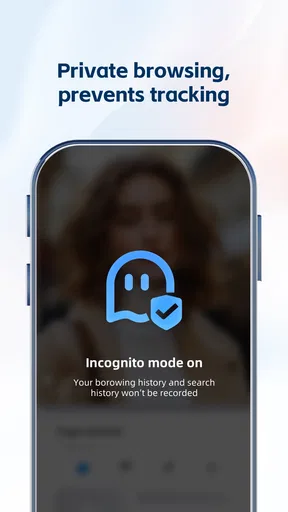
UC Browser includes incognito mode and built-in ad-blocking tools, which can make browsing feel less cluttered and help with casual privacy boundaries. I see those as useful controls, not a guarantee that every part of online activity is private. Incognito is most helpful when I do not want a browsing session kept in the usual local history; it should not be mistaken for a blanket shield from websites, networks, or every form of tracking.
If privacy is your deciding factor, take time to review the controls and settings available in the app and consider what kinds of sites you visit. The app’s name and privacy tools alone should not settle that question. I would also avoid opening sensitive material on a shared device unless I understood how that device handles accounts and saved information. A browser can offer helpful boundaries, but careful habits still matter.
Who will get the most from it
I can see UC Browser working well for people who want one place for ordinary browsing, occasional video viewing, downloads, and quick sharing, especially if data use and evening readability matter to them. The app has an average rating of 4.4 from around 22 million ratings, with over 1 billion installs, which suggests that it has reached a very broad audience. It is rated for Everyone and is free to install, with optional in-app purchases ranging from about ten cents to around one hundred dollars per item.
That reach does not mean it is the right choice for every phone. If you prefer a browser that stays minimal and keeps its interface focused on tabs and the address bar, a simpler alternative may feel calmer. If you rely on a particular browser’s sync habits or established workflow across devices, compare those details before switching. UC Browser’s extra tools are useful only if you actually want them; otherwise, they can feel like more interface to manage.
What to expect before installing
The app has been available since October 2011 and supports Android 8.0 and later. I would check that requirement before trying to install it on an older phone. It is also worth remembering that free installation does not mean every optional purchase is irrelevant: if you are sensitive to in-app spending, review purchase controls on your device before handing the phone to a child or anyone else who might tap through prompts.
One useful way to evaluate it is to try a few ordinary tasks rather than judge it from a single fast page load: open a link from a conversation, revisit a familiar site through a shortcut, download a file you need, and read something in night mode. That gives you a feel for whether its collection of tools genuinely saves effort. I would also compare how comfortable its layout feels over several days, since an interface that seems busy at first can either become familiar or remain a distraction.
UC Browser is strongest when the web is a regular part of how you follow conversations: links arrive, details need checking, and a page or file sometimes needs to be passed along. It is less compelling if you want a stripped-down browser or expect privacy tools to remove the need for judgment. Its social value comes from helping information move more smoothly, while the responsibility to choose what deserves your attention stays with you.
Hey there, fellow mobile users! So, I recently took the plunge and downloaded UC Browser-Safe, Fast, Private on my phone, and I’ve got all the juicy details for you. If you're like me, always on the hunt for a browser that doesn’t just browse but also keeps things secure and speedy, then read on!
First Impressions: A Sleek Start
From the get-go, UC Browser offers a neat and tidy interface that’s super easy to navigate. It’s like having that perfectly organized junk drawer—everything is just where you expect it to be. No fuss, no muss. The app’s design is intuitive, making it a breeze to jump right into browsing without any learning curve.
Speedy Gonzales: Browsing at Lightning Speed
Now, let’s talk about speed, because who has time to wait around for pages to load these days? UC Browser certainly lives up to its “Fast” label. Pages load quickly, and videos stream smoothly without that annoying buffering circle we all dread. It’s like having your own personal autobahn on your phone.
Privacy at Its Core
In today’s digital age, privacy is a big deal, right? Well, UC Browser-Safe, Fast, Private takes this seriously. It includes an incognito mode for those times when you want to keep your browsing history on the down-low. Plus, it has built-in ad blockers, so you’re not bombarded with ads every two seconds. This keeps your browsing experience clean and, more importantly, private.
Features That Stand Out
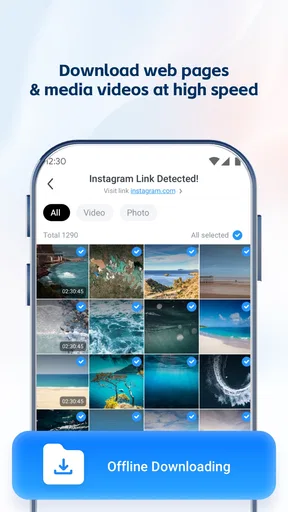
Besides the basics, UC Browser has some cool extras. It offers a smart download manager that prioritizes downloading your files efficiently. I’ve also found its night mode to be a lifesaver for my eyes during late-night surfing sessions. It dims the screen just right, so you’re not squinting in the dark.
There’s also a handy data-saving feature that minimizes data usage without compromising on speed. This is a godsend if you’re trying to keep your data charges under control while still enjoying endless browsing.
Customizable for Your Needs
One of the things I love about UC Browser is how customizable it is. You can tweak the interface to suit your style, whether you’re a minimalist or someone who likes a bit more flair. The homepage can be personalized with shortcuts to your favorite sites, making daily browsing tasks just a tap away.
The Social Media Edge
If you’re a social media butterfly, you’ll appreciate the built-in social media tools that allow you to quickly share content across various platforms. This feature is perfect for those moments when you stumble upon a meme that’s just too good not to share.
Final Thoughts: Is It Worth the Download?
So, here’s the bottom line: if you’re in the market for a browser that’s not just fast but also respects your privacy, UC Browser-Safe, Fast, Private might just be your new best friend. It’s loaded with features that make browsing not just efficient but also enjoyable. Whether you’re streaming videos, downloading files, or just casually surfing the web, it delivers a seamless experience.
In a world where digital privacy is more important than ever, having a reliable browser like this one is a smart move. Plus, with its speed and customization options, it’s hard not to love it. So, go ahead, give it a whirl, and see how it fits into your digital life. Happy browsing!
Pros
- Fast browsing speeds enhance user experience.
- Built-in ad blocker reduces interruptions.
- Incognito mode ensures privacy.
- Data saver mode minimizes data usage.
- Customizable home screen for easy access.
Cons
- Privacy concerns due to data collection.
- Occasional compatibility issues with sites.
- Some features locked behind ads.
- Frequent updates can be intrusive.
- Limited customer support availability.
FAQs for UC Browser-Safe, Fast, Private
What makes UC Browser stand out from other browsers?
UC Browser offers a unique combination of speed, privacy, and data-saving features. Its built-in ad blocker enhances browsing speed by removing unwanted ads. Additionally, it includes a robust privacy mode, ensuring that your browsing activities remain confidential. These features, coupled with its user-friendly interface, make it a popular choice among mobile users.
Is UC Browser safe to use on my device?
Yes, UC Browser is designed with user safety in mind. It includes features like a malware scanner and a privacy mode to protect your data. However, it's always recommended to download apps from official stores and keep your device updated to ensure maximum security.
How does UC Browser help save data usage?
UC Browser uses advanced data compression technology to reduce the amount of data consumed during browsing. This feature is particularly helpful for users with limited data plans, as it allows them to browse more without exceeding their data limits. The browser also provides options to customize data-saving settings according to user preferences.
Can I customize the UC Browser interface?
Yes, UC Browser offers a high level of customization. Users can change themes, adjust the layout, and even modify the homepage to suit their preferences. This flexibility allows users to create a personalized browsing experience that aligns with their individual needs and aesthetic tastes.
Does UC Browser support multiple languages?
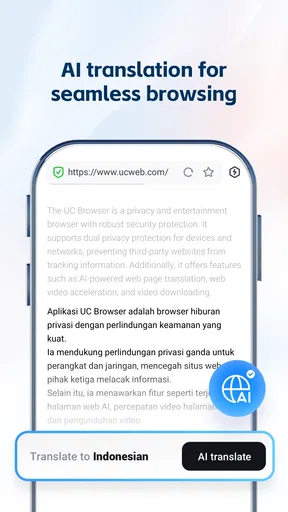
Absolutely. UC Browser supports a wide range of languages, making it accessible to users worldwide. This multilingual support ensures that users can navigate and utilize the app in their preferred language, enhancing the overall user experience and accessibility.


